Preparing to do the OraQuick® Hepatitis C Self-Test

There are some basic preparations you'll need to make before taking the OraQuick® Hepatitis C Self-Test. Please follow the test directions carefully to get an accurate result.

  • Do not eat, drink or use oral care products (such as mouthwash, toothpaste, or whitening strips) 30 minutes before starting this test.
  • Always use the directions in the Hepatitis C Self-Test kit to help read your results correctly.
  • Make sure you have a timer, watch or something that can time 20 to 40 minutes.

It may be helpful to have access to a phone to speak directly with a support person.

A negative test does not exclude the possibility of infection with Hepatitis C. It may take between 2 and 6 months from exposure for your body to develop antibodies, and for the test to detect your body’s response to Hepatitis C infection.

Other important information:

You must be 18 or older to use this test. You should not use this test if you are age 17 or younger.

If you're Hepatitis C positive or are taking medication to treat Hepatitis C, the OraQuick® test is not meant for you.

A negative test does not exclude the possibility of infection with Hepatitis C. It may take several months from exposure for the test to detect your body’s response to Hepatitis C infection.


Don't use the test if:

  • Any of the package contents are missing, broken, or have been opened.
  • Today's date has passed the expiration date printed on the outside of the box.
  • The test has been exposed to household cleaning products.
  • The test has been stored outside the acceptable temperature of 2°-30° C (36°-86°F).

Results in 3 Easy Steps

For complete instructions, refer to the testing materials and package insert provided with the test kit.

Step 1 - Swab

Step 1: Swab

Place the flat pad above the teeth against the outer gum. Gently swab completely around the outer gums, both upper and lower, one time around, using the Flat Pad.
Step 2 - Insert

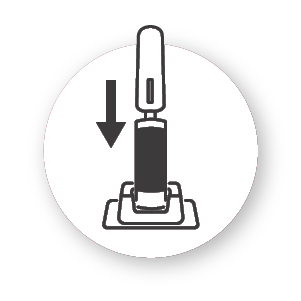
Step 2: Insert

Insert Flat Pad of device into the bottom of Developer Vial. Start timing the test, 20 minutes.

Step 3 - Read

Step 3: Read

Pink fluid will travel up to "T" and "C" result window. Fluid disappears as test develops. Read at 20 minutes.

**Read results after 20 minutes but not more than 40 minutes.


Reading your OraQuick® Hepatitis C Self-Test results

Interpreting the test is very simple. The below information explains how to tell when a test is negative or positive. Knowing your Hepatitis C status is an important part of your overall health. Regardless of your status, there are options for prevention and treatment to help keep you healthy. When performing a test, please refer to the Instructions for Use, inclusive of the warnings and precautions.

Negative Test

Negative Test

If there's one line next to the "C" and no line next to the "T", your result is non-reactive and should be interpreted as NEGATIVE. This means that hepatitis C antibodies were not detected in the specimen.

Negative Result Explanation

If your result is negative and if it has been at least 6 months since you have had a risk event and you have followed the directions carefully, then you likely do not have Hepatitis C.

If your test result is negative, consider following up with a nearby healthcare provider or testing facility.

For information about the test performance characteristics, please consult the Instructions for Use.

Warnings & Precautions

A negative result with this test does not mean that you are definitely not infected with Hepatitis C, it may take several months from exposure for the test to detect your body’s response to Hepatitis C infection.

The most important thing to keep in mind is that Hepatitis C is preventable. Understanding how you can avoid getting Hepatitis C is important to protect yourself and those around you.

Positive Test

If there are two complete lines, one next to the "C" and any line next to the "T"—even a faint line—the test is reactive and should be interpreted as PRELIMINARY POSITIVE. This means that antibodies for hepatitis C have been detected in the specimen, and you may have Hepatitis C.

Positive Result Explanation

If your result is positive a clinic or a healthcare professional must confirm your test result.

With new antiviral treatments, many people who are Hepatitis C-positive are able to clear the infection completely and return to normal life. The key is to identify the infection as early as possible before irreparable damage to the liver is done.

For information about the test performance characteristics, please consult the Instructions for Use.

Warnings & Precautions

A positive result with this test does not mean that you are definitely infected with Hepatitis C virus, but rather that confirmatory testing should be done in a medical setting.

Positive Test

Invalid Result

Invalid Result

If there is no line next to the "C" (even when there is a line next to the "T"), the test line or control line are not complete (all the way across the window), any of the lines are NOT inside the "C" or "T" triangle areas, or a red background makes it impossible to read the test, the test is not working and should be repeated.

Invalid Result Explanation

In case of invalid result, you will need to obtain another test, because the test did not work properly.

Visit a nearby Healthcare Provider or Testing Facility to test again.

0.9% of study subjects failed to obtain a test result.

This product should not be used to make decisions on behavior that may put you at increased risk of Hepatitis C infection.


How to Take the Test

In addition to the step-by-step instructions included with your OraQuick HCV Test, our video can help guide you through taking the test in a few short minutes.

Downloadable Instructions:

Select the translated instructions in your language of choice from the dropdown

Contact Us

We're Here for You

Questions about HCV self testing?

Learn More